
USB charging. In your arrangement.
Add one USB-A port and one USB-C port to a modular power strip, alongside the outlets and controls your desk needs.
Open the Custom Lab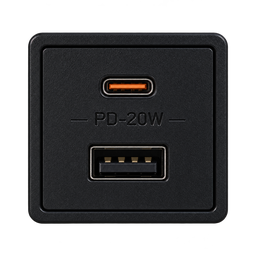
Two port types, one module choice.
The USB-C + USB-A module adds $10.80 USD to the build’s module subtotal. Chassis, slot, cable and optional finish charges are separate.
Position the charging module where you regularly connect portable devices. The builder lets you place multiple USB modules where slots remain available, alongside AC outlets for devices that use their own adapters.
Start with the chargers you actually use.
List which devices use a USB-A cable, which use USB-C, and which you intend to keep on their original AC adapter. That list helps decide whether you need another USB module or another outlet.
For a work desk, this might mean keeping a laptop’s existing charger on an AC outlet and placing the USB module within reach for accessories. For a gaming or creator setup, plan the cable route for controllers, portable devices or desk accessories first; their charging requirements still need checking.
Confirm output, not just connector shape.
A USB-C connector alone does not confirm a particular charging speed or device compatibility. Before ordering, ask MYON to confirm the specifications for the module in your final configuration:
- Available output from USB-A and USB-C when used separately.
- Available output when both ports are used together.
- Supported charging protocols and your device’s requirements.
- The cable required for that device and charging mode.
We do not promise laptop charging, a specific USB Power Delivery profile or a combined wattage without the applicable specification. Send MYON your device and charger details if you need confirmation.
Make room for the rest of your setup.
Choose a single row with 4, 6 or 8 slots, or a double row with 8, 12 or 16 slots. Include your main control and any chosen surge module in the slot plan rather than counting only outlets. Leave physical clearance for plugs and cables; the on-screen preview does not provide finished assembly measurements.
Read about surge-protection options separately. USB charging and protection are different choices in the Custom Lab.
Configure a strip with USB chargingMake it your own.
Choose your modules. Arrange your layout. Make it yours.
START